

On this page 7 sections
Yes, ChatGPT can now make animated GIFs. OpenAI added the feature on 4 November 2026 with its new image model, ChatGPT Images 2.6, and it's rolling out to all ChatGPT users on the web, desktop and phone apps, including free accounts. You type a prompt or upload a photo, ChatGPT gives you a short looping GIF, and you can then change its speed or fix single frames.
Before this update you had to generate separate stills and stitch them together in another app. Now the ChatGPT GIF maker does it in one request.
What's new in ChatGPT Images 2.6
- Animated GIFs from a text prompt, a photo or even a rough sketch
- Speed control and frame-by-frame edits after the GIF is made
- A reference library where you save pictures of yourself, a pet or a character once and reuse them later
- Faster image generation overall, according to OpenAI
The reference library matters more than it sounds. If you make a series of GIFs starring the same dog or the same cartoon mascot, you don't have to upload the photo every time, and OpenAI says characters and products should look the same from one image to the next.
OpenAI also says people now create more than 4 billion images a week across ChatGPT and its API, up from about 3 billion in September. That number covers all images, not just GIFs. Codex, OpenAI's coding assistant, gets Images 2.6 too (TNW has the rollout details).
How to make a GIF in ChatGPT, step by step
The buttons can look a little different on the web, iPhone and Android apps while the update rolls out, but the flow is the same everywhere.
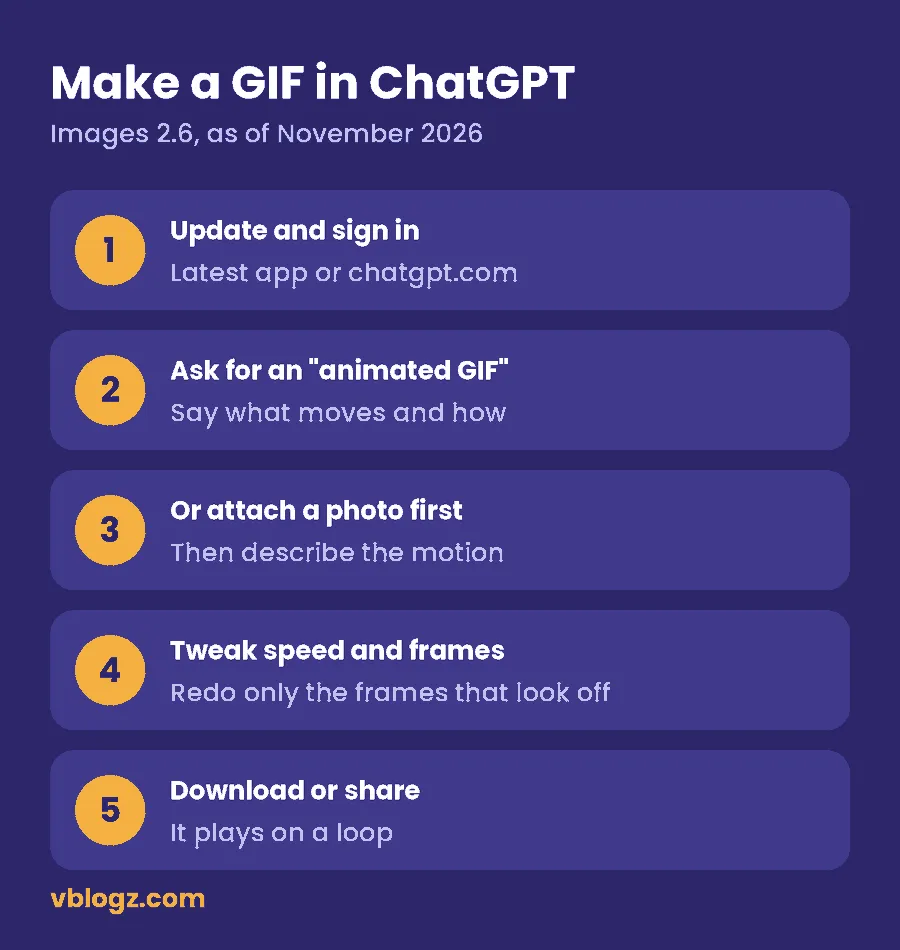
- Update and sign in. Get the latest ChatGPT app from the App Store or Google Play, or refresh chatgpt.com.
- Ask for an animated GIF. Start a new chat and say what should move. For example: "Make an animated GIF of a paper boat bobbing in a rain puddle, looping smoothly."
- Or animate your own photo. Attach the picture first, then describe the motion: "Turn this photo of my dog into a GIF where his tail wags."
- Fix what looks off. Change the playback speed, or open single frames and redo only the ones that are wrong instead of starting again.
- Download or share. GIFs play on a loop in most chat apps and social sites.
Prompt tips that save you retries
Image models handle one clear movement far better than a busy scene. A blink, a wave or a spinning coffee cup is a safer bet than "a crowd dancing at a party".
- Name the motion and the direction ("the balloon floats up and drifts right").
- Ask for a loop with no jump between the last and first frame.
- Keep the background plain if you want a clean, small file.
- Save repeat subjects to the reference library so they stay consistent.
Is the ChatGPT GIF maker free? Plans and prices by country
Yes, you can make GIFs on the free plan. The limit is your image allowance. Free accounts get a capped number of image generations, and OpenAI doesn't publish an exact daily figure, so if you make lots of GIFs you'll hit the cap fast. Paid plans raise it.
| Plan | Good for | Monthly price (as of November 2026) |
|---|---|---|
| Free | Trying a few GIFs | US$0 / £0 / ₹0 |
| Go | More images on a budget | ₹399 in India; differs by country |
| Plus | Regular creators | US$20 in the US; £16 plus VAT in the UK (about £19.20) |
| Pro | Heavy daily use | Much higher; shown in local currency at checkout |
In Canada and Australia you're billed in CA$ and A$. For Plus in India, price trackers list different figures, so check the plan page inside the app before you pay. Prices shown in the app or at chatgpt.com/pricing are the ones that count.
Our view: if you only want a handful of reaction GIFs a week, stay on the free plan. If you run a small business page and want fresh animated posts every day, Plus is the realistic starting point. For a wider look at what each AI subscription gets you, see our AI tools and prices comparison.
Is it available in my country?
OpenAI says Images 2.6 is rolling out to all ChatGPT users, so if ChatGPT works where you live, GIFs should reach your account. That covers the US, UK, Canada, Australia, India and the other regions where ChatGPT is offered. Rollouts arrive in waves, so a friend may get it a day or two before you.
If you can't see it yet:
- Update the app and restart it.
- Log out and back in on chatgpt.com.
- Ask for "an animated GIF" in a brand new chat.
- Give it a couple of days, since the rollout is gradual.
Use it safely: photos, fake apps and storage
Animating photos is fun, but a few habits keep you out of trouble.
- Ask before you animate someone. Only turn a photo of a real person into a GIF if they're fine with it, and don't make GIFs that could mislead people about what someone said or did.
- Skip look-alike apps. The feature lives in the official ChatGPT app and chatgpt.com. Apps calling themselves a "ChatGPT GIF maker" in app stores aren't made by OpenAI, so don't give them your login or card details. Our guide to spotting online scams covers the warning signs.
- Watch your storage. Saved GIFs pile up quickly in your gallery and cloud backup. If your phone or Google account fills up, here's how to free up Google storage.
What developers get: GPT-Image-2.6 Flare and Sunburst
For the API, OpenAI split the new model into two versions, one tuned for speed and one for quality.
| API model | Built for | What OpenAI says |
|---|---|---|
| GPT-Image-2.6 Flare | Speed | Images in as little as six seconds at low quality; tidier layouts for posters and product shots |
| GPT-Image-2.6 Sunburst | Quality | Sharper detail that stays consistent across edits at medium or high quality |
OpenAI says the new API models generate images 50% faster. The API also adds image markup (you highlight the exact area to change), SVG export, and a setting that controls how much the model plans before it draws, which Digital Trends describes as useful for small edits at low settings. Check OpenAI's pricing page before you budget. Some early developers report that low and medium quality images cost more than with the previous model.
Frequently asked questions
Can ChatGPT make GIFs from images?
Yes. Upload a photo or a sketch, then describe the movement you want. ChatGPT Images 2.6 turns it into a looping GIF that you can speed up, slow down or fix frame by frame.
Is the ChatGPT GIF generator free?
It's included on the free plan, but free accounts have a limited image allowance that OpenAI doesn't state as a fixed number. Go, Plus and Pro give you more generations.
Can ChatGPT edit GIFs?
You can edit the GIFs ChatGPT makes: change the speed and redo individual frames. OpenAI's announcement focuses on GIFs made inside ChatGPT, so to animate your own material, start from a still photo.
How long can a ChatGPT GIF be?
OpenAI hasn't published a length limit for GIFs in the ChatGPT app. They're designed as short loops, the kind you'd send as a reaction or use on a social post.
Do I need Codex or the API to make GIFs?
No. The regular ChatGPT app or website is enough. Codex and the API are for developers who want to build image features into their own tools.


Comments 0
No comments yet. Start the conversation.