
On this page 5 sections
The best free AI image generator for most people right now is Google Gemini, with Microsoft's Bing Image Creator a close second if you want a clear daily allowance. ChatGPT, Meta AI and Adobe Firefly are also free to try, but each one has a catch: hidden limits, a sign-in requirement, or a cap that shrinks when servers are busy. We checked each company's own help pages in November 2026 so you know exactly what "free" means before you start typing prompts.
The short version (as of November 2026):
- Best overall free pick: Gemini, which uses Google's Nano Banana 2 image model even on the free plan.
- Clearest free limit: Bing Image Creator, with a daily batch of fast images and slower generations after that.
- Best for edits in a chat: ChatGPT, though OpenAI doesn't publish the free image limit.
- No sign-up? None of the five big tools below promise image creation without an account, so plan on signing in.
Best free AI image generator: the 5 picks compared
All five tools turn a text prompt into a picture at no cost. What changes is how much you get, how you sign in and what happens when you hit the wall.
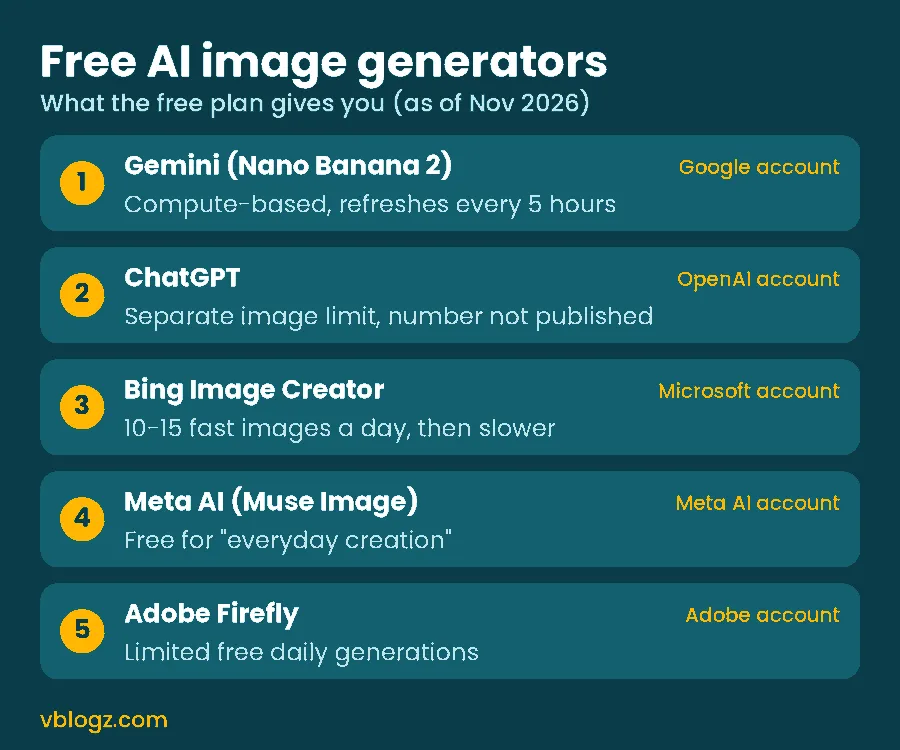
| Tool | Account needed | Free limit (official wording) | Best for |
|---|---|---|---|
| Google Gemini | Google account | "Standard limits", compute-based, refresh every 5 hours up to a weekly cap | Photo-real images and quick edits |
| ChatGPT | OpenAI account | Image creation has its own usage limit; no number published | Back-and-forth edits in plain English |
| Bing Image Creator | Personal Microsoft account | A daily set of fast creations (10 to 15, see below), then standard speed | Lots of tries without paying |
| Meta AI (Muse Image) | Meta AI on the web or in Meta apps | "Free for everyday creation" | Fun images inside apps you already use |
| Adobe Firefly | Adobe account | "Limited" free daily generations | Work projects and commercial use |
1. Google Gemini (Nano Banana 2)
Gemini is our top free pick because Google gives free users the same headline image model as paying users. Its official limits page lists "Image generation with Nano Banana 2" for people without a Google AI plan. The more advanced Nano Banana Pro redo option is shown for paid plans.
The catch: Google doesn't give a fixed number of images. Free accounts get "standard limits" that are based on compute, refresh every 5 hours and stop at a weekly cap. Image and video requests use more of that allowance than text chats, and free users may be limited first when demand is high. Paid plans get 2x (AI Plus) or 4x (AI Pro) the standard limits.
Age rule: you need to be 13 or older in most countries, and 18 or older in the UK, EU/EEA and Switzerland.
2. ChatGPT
ChatGPT is the easiest tool for fixing an image by talking to it ("make the sky darker", "move the text to the top"). OpenAI's Free tier FAQ confirms image creation is included for free users.
The catch: OpenAI says image generation has a separate usage limit from text chat, but it doesn't say how many images that is. When you hit it, ChatGPT tells you and you wait until later, or upgrade. If you only need one or two images a day, that's rarely a problem. For a batch of 20 social posts, it is.
If you want to turn ChatGPT images into short animations, our ChatGPT GIF maker guide shows the steps and prompts.
3. Bing Image Creator (Microsoft)
Bing Image Creator is the most generous tool for sheer volume. Microsoft's Image Creator FAQ says it's free for anyone with a Microsoft account. You get a daily set of fast creations, and once they're gone you drop to standard speed instead of being blocked. Unused fast creations don't roll over.
The catch: Microsoft's own page isn't consistent. The FAQ says 15 fast creations a day, while a banner on the same site says 10. There's also a cap of 200 prompts per 24 hours, and edits count toward it. Work or school (Entra ID) accounts aren't supported, so use a personal Outlook or Hotmail login. The current model listed in the FAQ is MAI-Image-2.6-Flash, and signed-in users can switch a watermark on or off in settings.
4. Meta AI (Muse Image)
Meta launched Muse Image, its first image model from Meta Superintelligence Labs, in Meta AI on 7 July 2026. Meta's announcement says using it "is free for everyday creation", with more available through Meta's paid plans.
The catch: "everyday creation" isn't a number. Availability also varies: it's in Meta AI on the web and in Instagram Stories effects, while WhatsApp started in a limited set of countries. If you'd rather keep Meta AI out of your chats altogether, here's what you can and can't switch off.
5. Adobe Firefly
Firefly is the safest choice when the image is for work. Adobe says outputs from its non-beta Firefly features can be used in commercial projects, which most other free tools don't spell out clearly.
The catch: the free plan is the smallest. Adobe's generative credits FAQ (updated 24 November 2026) describes a limited number of free daily generations, without giving a fixed figure. It's fine for testing, not for daily heavy use.
Which free AI image generator should you use?
Pick by the job, not by the brand:
- A realistic photo or a quick edit of your own picture: start with Gemini.
- Lots of attempts at one idea: Bing Image Creator, because you keep going at standard speed after the fast batch runs out.
- Fine-tuning one image step by step: ChatGPT.
- A logo concept, flyer or ad you'll actually use for a business: Adobe Firefly, then check the terms for your exact use.
- Fun images to share on Instagram or WhatsApp: Meta AI.
A simple trick: when one tool says you've hit your limit, paste the same prompt into the next one. Using two free tools side by side gives you more images a day than any single free plan.
Want the full list of AI tools beyond image makers, including free chat and writing tools? See our best AI tools of 2026 guide.
How to get better images from a free AI image generator
Free plans make every attempt count, so a good first prompt saves you from burning through your limit. Use this order:
- Subject: what's in the picture ("a golden retriever wearing a raincoat").
- Setting: where it is ("on a wet London street at night").
- Style: photo, watercolour, 3D render, flat illustration.
- Light and mood: "soft morning light", "neon reflections".
- Format: "square for Instagram" or "wide 16:9 banner".
Copy-paste prompts to try:
- "A cosy reading corner with a green armchair and a window with rain outside, realistic photo, warm lamp light, square format."
- "Flat illustration of a laptop with a rocket coming out of the screen, blue and orange colours, white background, for a blog header."
- "Birthday poster that says 'Happy 30th, Sam' in big bold letters, balloons and confetti, bright colours, portrait format."
Short words in quotes (like a name on a poster) come out far more reliably than long sentences, so keep any text in the image to a few words.
Free AI image generator not working? Quick fixes
Most problems come down to limits, account type or the prompt itself:
- "You've reached your limit": on ChatGPT and Gemini, wait for the reset (Gemini refreshes every 5 hours) or switch tools. On Bing, you'll just get slower images.
- Bing won't let you sign in: you're probably using a work or school account. Use a personal Microsoft account instead.
- Gemini says you're not eligible: check the account's age setting. In the UK and EU you must be 18 or older.
- Your prompt was blocked: every tool refuses some content, such as real people in misleading scenes or adult material. Rephrase without names of real people.
- Text in the image is garbled: shorten it to one to four words, put it in quotes and ask for "large, clear lettering".
- Meta AI image option missing in WhatsApp: it's rolling out by country. Try meta.ai in a browser instead.
Frequently asked questions
What is the best free AI image generator?
For most people it's Google Gemini, because the free plan uses Nano Banana 2, the same main image model as paid plans. Bing Image Creator is the best choice if you need many attempts, since it doesn't stop you after the fast images run out.
Is there a free AI image generator with no sign-up?
Not among the big names. None of the five tools here promises image creation without an account, and Gemini, ChatGPT, Bing Image Creator and Firefly all ask you to sign in. Be careful with unknown "no login" sites, which often push ads or ask for payment later.
Is Gemini's AI image generator free?
Yes. Google lists image generation with Nano Banana 2 for users without a Google AI plan. There's no fixed daily number: limits are compute-based, refresh every 5 hours and stop at a weekly cap.
Can I use free AI images commercially?
It depends on the tool. Adobe says outputs from non-beta Firefly features can be used in commercial projects. For the others, read that tool's terms before using an image in an ad, product or logo.
How many free images can I make in ChatGPT?
OpenAI doesn't publish a number. Its help centre says image creation has a separate usage limit from chat and that ChatGPT tells you when you reach it.


Comments 0
No comments yet. Start the conversation.