

On this page 8 sections
- How to download Aadhaar card online (myAadhaar portal)
- Aadhaar card download password
- Download e-Aadhaar on the new Aadhaar app
- Masked Aadhaar: which one should you download?
- Download Aadhaar without a registered mobile number
- Aadhaar PVC card: price and delivery
- Stay safe while downloading
- Frequently asked questions
To download your Aadhaar card, go to myaadhaar.uidai.gov.in, tap Download Aadhaar, enter your Aadhaar number, Enrolment ID or Virtual ID, and type the OTP that comes to your registered mobile. The e-Aadhaar PDF downloads free. Its password is the first four letters of your name in capitals plus your year of birth, for example SURE1990.
The downloaded e-Aadhaar is as valid as the printed card for every purpose, according to UIDAI. You don't need to pay anyone to download it. Steps, passwords and fixes for common problems are below, as of November 2026.
How to download Aadhaar card online (myAadhaar portal)
- Open myaadhaar.uidai.gov.in in your browser. Type it yourself instead of clicking a link from a message.
- Tap Download Aadhaar.
- Pick what you have: Aadhaar number (12 digits), Enrolment ID (the 28-digit number on your enrolment slip, for a new Aadhaar), or Virtual ID (16 digits).
- Type the number and the captcha, then tap Send OTP.
- Enter the 6-digit OTP sent to the mobile number linked to your Aadhaar.
- Choose Masked Aadhaar if you want only the last 4 digits to show, or leave it unticked for the full number.
- Tap Verify & Download. The PDF saves to your phone or computer.
On Android, the file usually lands in the Downloads folder. On an iPhone, open the Files app and look in Downloads.
Aadhaar card download password
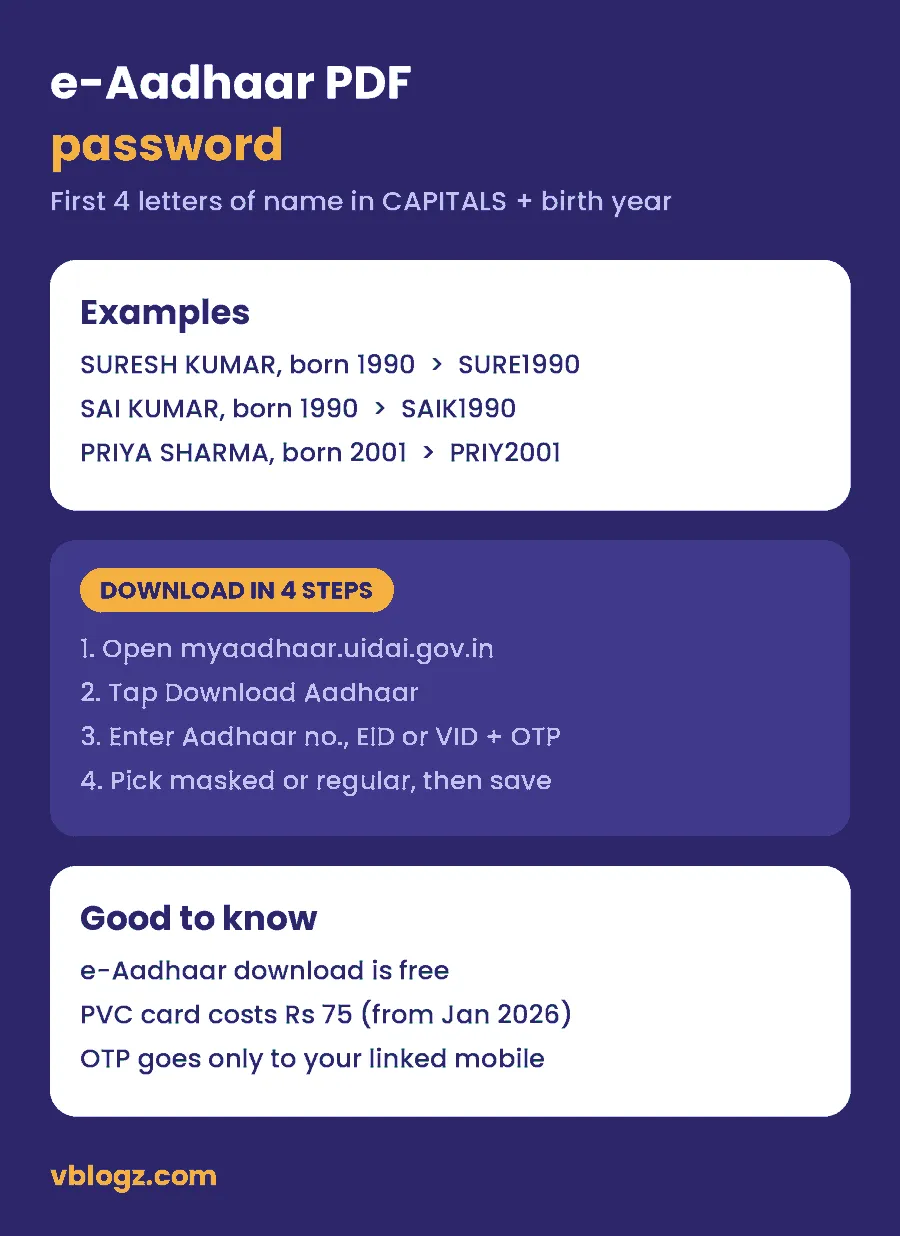
The e-Aadhaar PDF is locked with an 8-character password: the first four letters of your name in CAPITAL letters, followed by your year of birth in four digits.
| Name on Aadhaar | Year of birth | Password |
|---|---|---|
| Suresh Kumar | 1990 | SURE1990 |
| Sai Kumar | 1990 | SAIK1990 |
| Priya Sharma | 2001 | PRIY2001 |
Three things trip people up:
- Spaces don't count. If your first name has only three letters, the fourth letter comes from the next word (SAI KUMAR becomes SAIK).
- Use the spelling on your Aadhaar, not the spelling you normally use. If Aadhaar says "Mohd", the password starts with MOHD.
- Type the letters in capitals. "sure1990" won't work.
You can't change or reset this password. It's the same for every download.
Download e-Aadhaar on the new Aadhaar app
UIDAI's new Aadhaar app, launched in January 2026, is replacing the older mAadhaar app, which is being phased out. UIDAI's website links to it on the Play Store and App Store. Check that the developer is UIDAI before you install it.
- Install the Aadhaar app and pick your language.
- Enter your Aadhaar number and the OTP sent to your registered mobile.
- Set up face authentication and a PIN.
- Open your profile and use the e-Aadhaar download option.
According to ClearTax, the app can hold up to five family members' profiles on one phone. It also lets you lock your biometrics and share only selected details, such as proof that you're over 18, through a QR code instead of handing over a photocopy. You can also get e-Aadhaar free through DigiLocker and UMANG.
Masked Aadhaar: which one should you download?
A masked Aadhaar hides the first 8 digits of your number and shows only the last 4. Everything else, including your photo and QR code, stays the same.
- Use masked for hotels, travel bookings, SIM cards, gyms and anywhere that only needs to check who you are.
- Use regular where the full number is needed, such as some bank KYC, government scheme forms or PAN linking.
When you're not sure, carry the masked one. Giving out your full Aadhaar number is one of the ways fraudsters open SIMs or accounts in your name. See our guide on how to check how many SIM cards are in your name.
Download Aadhaar without a registered mobile number
The online download only works if a mobile number is linked to your Aadhaar, because the OTP goes to that number. If yours isn't linked, or the old number is switched off:
- Visit an Aadhaar Seva Kendra or an enrolment centre at a bank or post office and ask to update your mobile number. You'll need your fingerprint, so you must go in person.
- UIDAI says the new Aadhaar app can also handle mobile number updates. Updates can take up to 30 days to show.
- Once the new number is active, download e-Aadhaar as normal.
If you've lost both your Aadhaar number and enrolment slip, use Retrieve EID/UID on the myAadhaar portal. It sends the number to your registered mobile or email.
Aadhaar PVC card: price and delivery
If you want a plastic card like an ATM card, order an Aadhaar PVC card from the myAadhaar portal under "Order Aadhaar PVC Card".
- Fee: ₹75, including GST and Speed Post. UIDAI raised it from ₹50 on 1 January 2026.
- Delivery: UIDAI hands the card to India Post within about 5 working days. Speed Post then delivers it to your Aadhaar address.
- Tracking: use the SRN from your order on "Check Aadhaar PVC Card Status".
Only order from UIDAI's own site. Shops that print "PVC Aadhaar" from a PDF aren't the official card.
Stay safe while downloading
- The only official sites are uidai.gov.in and myaadhaar.uidai.gov.in. Ignore look-alike sites that rank in search or come by WhatsApp.
- No real UIDAI service asks you to pay for an e-Aadhaar download.
- Never share the Aadhaar OTP with anyone who calls you. Our guide to spotting online fraud lists common scripts.
- UIDAI's helpline is 1947.
Pensioners can use the same Aadhaar to submit a Jeevan Pramaan life certificate from home.
Frequently asked questions
What is the password to open the Aadhaar card PDF?
It's the first four letters of your name in capital letters plus your year of birth. For Suresh Kumar born in 1990, the password is SURE1990.
Can I download Aadhaar card without OTP?
Not online. The download needs the OTP sent to your Aadhaar-linked mobile. If that number isn't working, update it at an Aadhaar Seva Kendra first.
Is a downloaded e-Aadhaar valid?
Yes. UIDAI treats the downloaded e-Aadhaar as equally valid as the original letter or card for identity and address proof.
Is Aadhaar card download free?
Yes. e-Aadhaar is free on the myAadhaar portal, the Aadhaar app, DigiLocker and UMANG. Only the PVC card costs money (₹75).
Can I download Aadhaar with my enrolment number?
Yes. Choose Enrolment ID on the download page and enter the 28-digit number from your slip, including the date and time part. You'll still need the OTP on your mobile.







Comments 0
No comments yet. Start the conversation.