

On this page 9 sections
- The 5 types of computer network by area
- LAN vs MAN vs WAN: comparison table
- Other network types you may be asked about
- Types of computer network architecture: client-server and peer-to-peer
- Network topology types
- Types of network cables and transmission media
- Devices that make a network work
- Types of computer network in Hindi
- Frequently asked questions
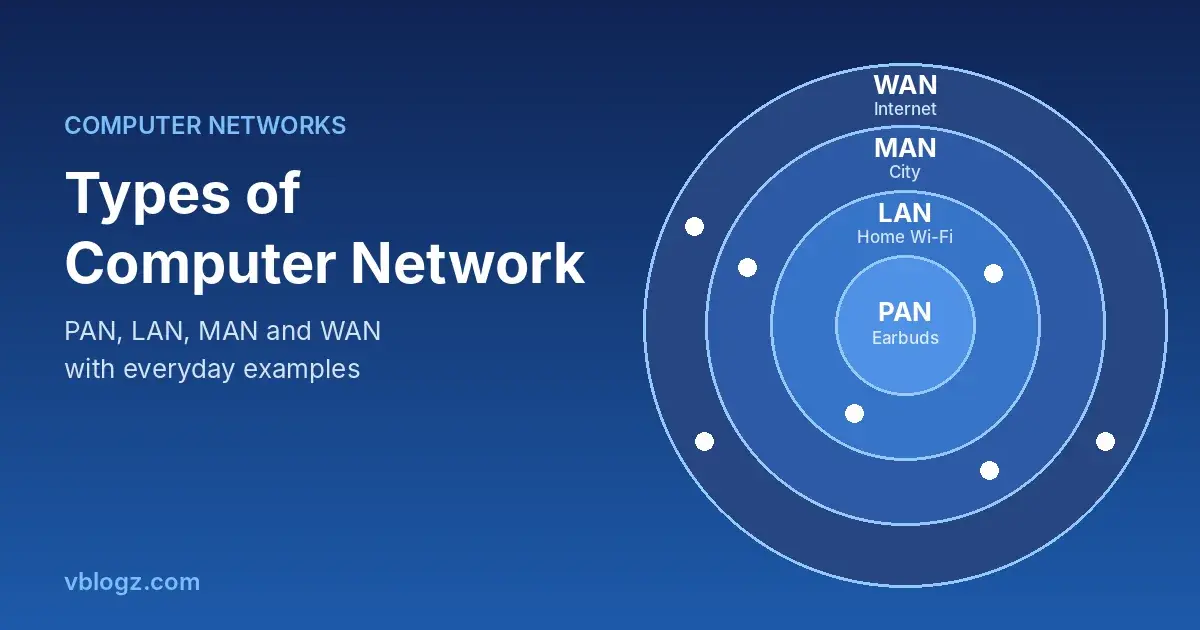
There are five main types of computer network, based on how big an area they cover: PAN (Personal Area Network), LAN (Local Area Network), CAN (Campus Area Network), MAN (Metropolitan Area Network) and WAN (Wide Area Network). Most textbooks teach the core three, LAN, MAN and WAN, so if a question asks for three types, those are the ones.
A computer network is simply two or more devices connected so they can share data. You use several types every day without thinking about it. Below, each type is explained with an example you'll recognise, followed by a comparison table, the common topologies and the devices that hold a network together.
The 5 types of computer network by area
1. PAN: Personal Area Network
A PAN connects devices around one person, usually within a few metres. Your phone paired with Bluetooth earbuds and a smartwatch is a PAN. So is a laptop connected to a phone's hotspot over a USB cable.
- Range: a few metres around you
- Built with: Bluetooth, USB, NFC
- Example: phone + earbuds + smartwatch
2. LAN: Local Area Network
A LAN connects devices in one home, office, lab or building. Your home Wi-Fi router, with phones, a laptop and a smart TV on it, is a LAN. A school computer lab where all PCs share one printer is another. LANs are fast and cheap because the owner controls all the equipment.
- Range: one building or floor
- Built with: Ethernet cables, Wi-Fi, switches, a router
- Example: home Wi-Fi, office network, cyber café
A LAN that runs over Wi-Fi is called a WLAN (Wireless Local Area Network).
3. CAN: Campus Area Network
A CAN links several LANs across a campus: a university, a large hospital or a company with many buildings. Each building has its own LAN, and fibre cables join them so students or staff can use the same network anywhere on campus.
- Range: a group of buildings on one site
- Example: IIT or university campus Wi-Fi
4. MAN: Metropolitan Area Network
A MAN covers a city or a large town. It joins LANs across different locations within one city, for example all the branches of a bank in Pune, or a city's traffic camera network. Local cable TV and broadband operators that run fibre across a city operate MAN-sized networks.
- Range: a city
- Built with: fibre optic cables, high-capacity links leased from telecom companies
- Example: a city-wide cable broadband network
5. WAN: Wide Area Network
A WAN covers states, countries or the whole world. The internet is the largest WAN. Private WANs are common too: a bank connecting branches across India, or the railway reservation system that lets you book a ticket at any station. India's National Knowledge Network, which links universities and research institutions across the country, is another example.
- Range: country or worldwide
- Built with: undersea and long-distance fibre, telecom networks, satellite links
- Example: the internet, bank and railway networks
LAN vs MAN vs WAN: comparison table
This is the table most exams and class 8 to 10 textbooks expect you to know.
| Point | LAN | MAN | WAN |
|---|---|---|---|
| Full form | Local Area Network | Metropolitan Area Network | Wide Area Network |
| Area | Building or campus | City | Country or world |
| Speed | Highest | Medium to high | Lower, varies a lot |
| Cost to set up | Low | Medium to high | Very high |
| Owned by | One person or organisation | Organisation, city body or operator | Many organisations together |
| Errors and delay | Fewest | Moderate | Most |
| Example | Home Wi-Fi | City cable broadband | The internet |
Other network types you may be asked about
- SAN (Storage Area Network): a high-speed network that connects servers to shared storage in data centres.
- VPN (Virtual Private Network): not a physical network but an encrypted tunnel over the internet. Companies use it so staff at home can reach the office LAN safely.
- EPN (Enterprise Private Network): a company's own network linking its offices, often built as a private WAN.
Types of computer network architecture: client-server and peer-to-peer
Networks are also grouped by how computers share work, not just by area. This is called network architecture, and there are two main types.
- Client-server: central servers store data and provide services, and other computers (clients) request them. Gmail, banking apps and office file servers work this way. It's easier to secure and back up.
- Peer-to-peer (P2P): every computer is equal and shares directly with others. Nearby Share between two phones is a simple example. It's cheap but harder to manage at scale.
Network topology types
Topology is the layout: how the devices are connected to each other.
| Topology | How it's connected | Good | Bad |
|---|---|---|---|
| Bus | All devices on one main cable | Cheap, little cable | One cable fault stops everything |
| Ring | Each device joined to two neighbours in a circle | Orderly data flow | One broken link can break the ring |
| Star | Every device connects to a central switch or router | Easy to add devices, one fault stays local | If the centre fails, all stop |
| Mesh | Devices connect to many others | Very reliable, many paths | Expensive, lots of links |
| Tree | Star networks joined in a hierarchy | Scales well for big offices | Depends on the main backbone |
| Hybrid | A mix of two or more of the above | Flexible | Complex to design |
Your home Wi-Fi is a star: every device talks to the router in the middle. Mesh Wi-Fi systems, sold to cover big houses, borrow the mesh idea by linking several units together.
Types of network cables and transmission media
Transmission media is whatever carries the data between devices. It is either wired (guided) or wireless (unguided).
| Medium | Type | Where it's used |
|---|---|---|
| Twisted pair cable (Cat5e, Cat6) | Wired | Ethernet in homes and offices. A single run is usually kept under 100 metres |
| Coaxial cable | Wired | Cable TV and older cable broadband |
| Fibre optic cable | Wired | Sends light pulses. Used for home fibre, city links and undersea internet cables |
| Radio waves | Wireless | Wi-Fi, Bluetooth and mobile data |
| Microwave | Wireless | Tower-to-tower links between mobile towers |
| Infrared | Wireless | Very short range, line of sight, like a TV remote |
| Satellite | Wireless | Remote areas, ships and satellite internet |
Devices that make a network work
| Device | What it does |
|---|---|
| Modem | Converts your ISP's signal (fibre, DSL, cable) into data your devices can use. The name comes from modulator-demodulator |
| Router | Sends data between your home network and the internet, and hands out local addresses |
| Switch | Connects wired devices within a LAN and sends data only to the right port |
| Hub | An older, simpler switch that sends data to every port |
| Access point | Adds Wi-Fi to a wired network |
| NIC | Network Interface Card, the part inside a device that connects it to a network |
Most home fibre connections in India (JioFiber, Airtel Xstream, BSNL Bharat Fibre and others) give you one box that works as modem, router and access point together. For the full forms of DNS, TCP/IP, DHCP and other networking terms, see the networking table in our computer full forms list.
Types of computer network in Hindi
A computer network is called कंप्यूटर नेटवर्क in Hindi. Hindi-medium books name the five types like this:
| Type | Hindi name | Area |
|---|---|---|
| PAN | व्यक्तिगत क्षेत्र नेटवर्क | कुछ मीटर |
| LAN | स्थानीय क्षेत्र नेटवर्क | एक इमारत |
| CAN | कैंपस क्षेत्र नेटवर्क | एक कैंपस |
| MAN | महानगरीय क्षेत्र नेटवर्क | एक शहर |
| WAN | विस्तृत क्षेत्र नेटवर्क | देश या पूरी दुनिया |
Frequently asked questions
How many types of computer network are there?
By area there are five main types: PAN, LAN, CAN, MAN and WAN. Many textbooks teach only three, LAN, MAN and WAN, and treat PAN and CAN as extra types.
What are the three types of computer network?
LAN (Local Area Network), MAN (Metropolitan Area Network) and WAN (Wide Area Network). They differ mainly in the area they cover, from one building to a city to the whole world.
What are the two types of computer network?
When a question asks for two types, it usually means network architecture: client-server and peer-to-peer. Some books instead split networks into wired and wireless.
Is the internet a type of computer network?
Yes. The internet is the largest WAN, made by connecting millions of smaller networks. That's where its name comes from: it's short for internetwork. Our post on whether computer and internet have full forms explains more.
Which type of network is used at home?
A LAN, usually a wireless one (WLAN) built around your Wi-Fi router. Your Bluetooth devices around you also form a small PAN.
Which network topology is most common?
Star topology. Almost every home and office network connects devices to a central router or switch, because a fault in one cable affects only that device.




Comments 0
No comments yet. Start the conversation.